Medical - WEB
Presentation of the new medical module for the WEB version of MyCoach Pro.
↪️ Click here to see the mobile version 📱
Module access and organization
The web medical module integrates into a customizable environment.
From the home screen, shortcuts can be added to access the most frequent actions more quickly, including:
- Add a pathology
- Add a consultation
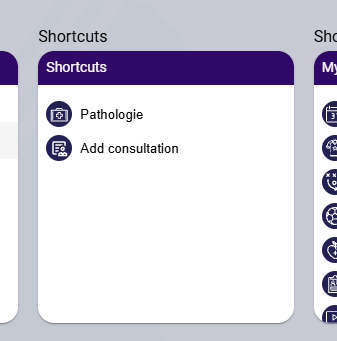
The side menu can also be configured to adapt the interface to each user's role and usage.
In its general structure, the module is organized around the following entries:
- Patients
- Consultations
- Notes
- Pathologies
- Statistics
- Documents
- Medications
- Settings
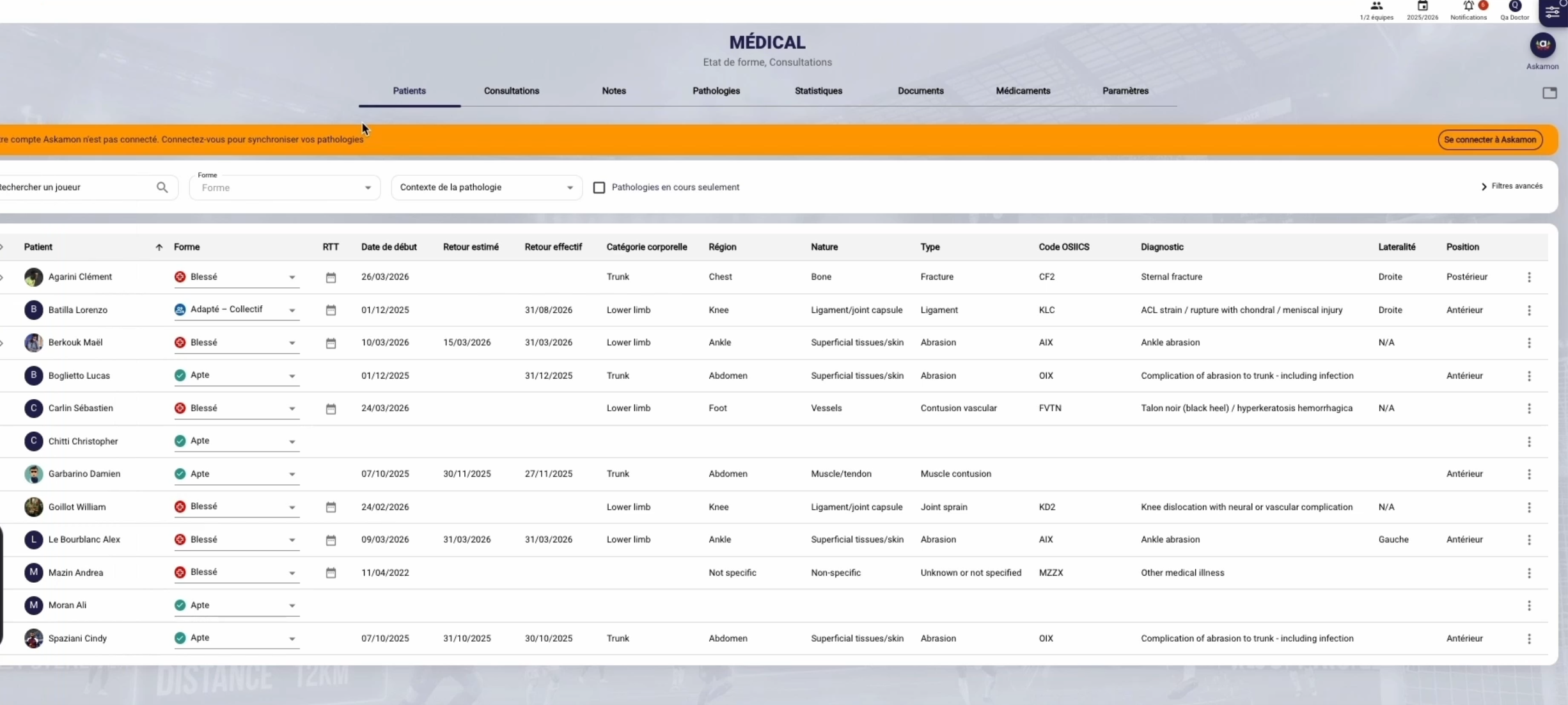
This structure allows navigation either by player, by type of information, or by level of analysis.
Patients
The Patients tab allows you to open a player's medical record and find the main information related to them.
This view serves as an individual entry point into the module. It allows you to refocus on a given player and more easily find their pathologies, consultations, documents and monitoring elements.
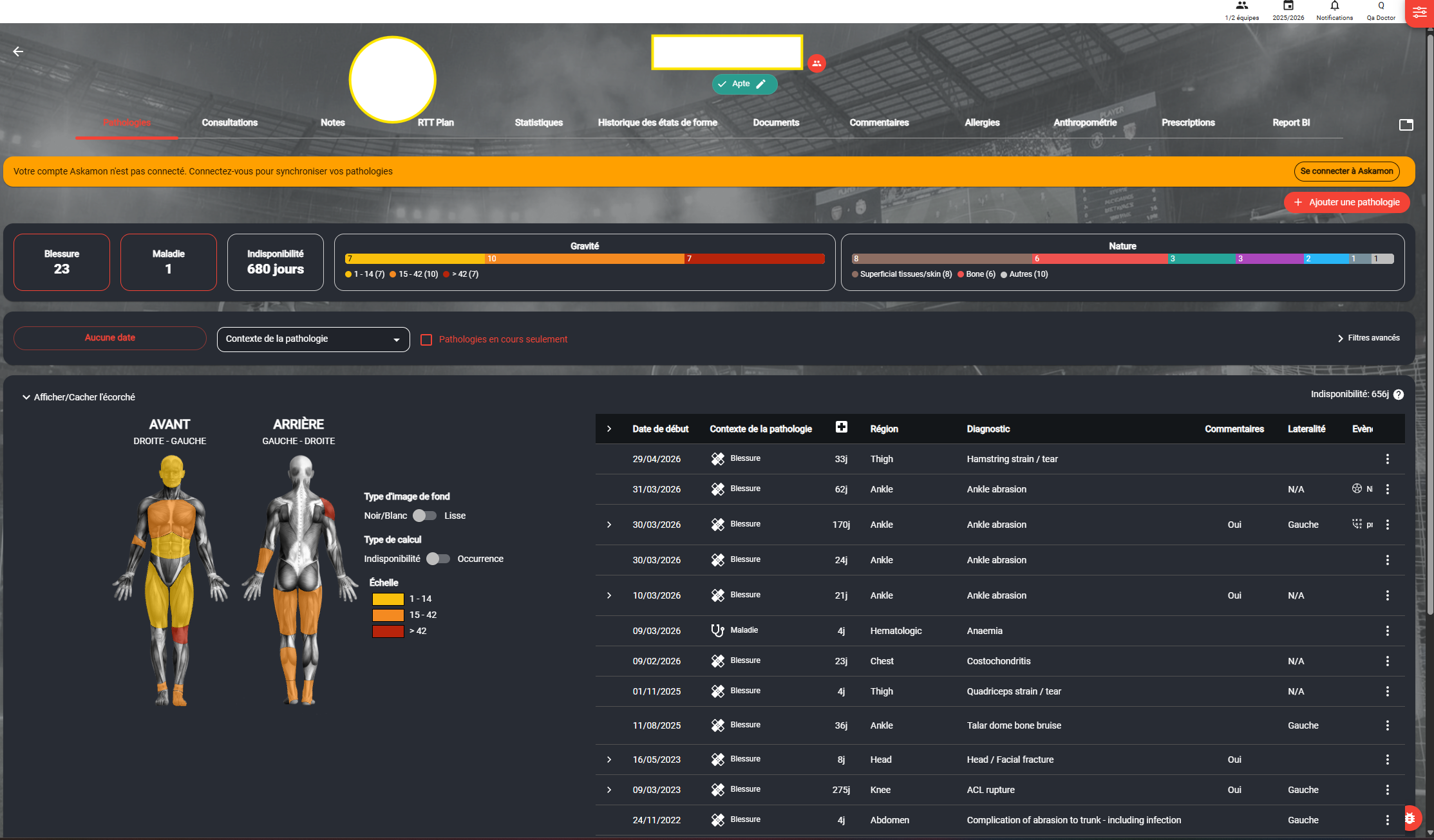
Type of pathology
Two main categories are available:
- Injury
- Illness
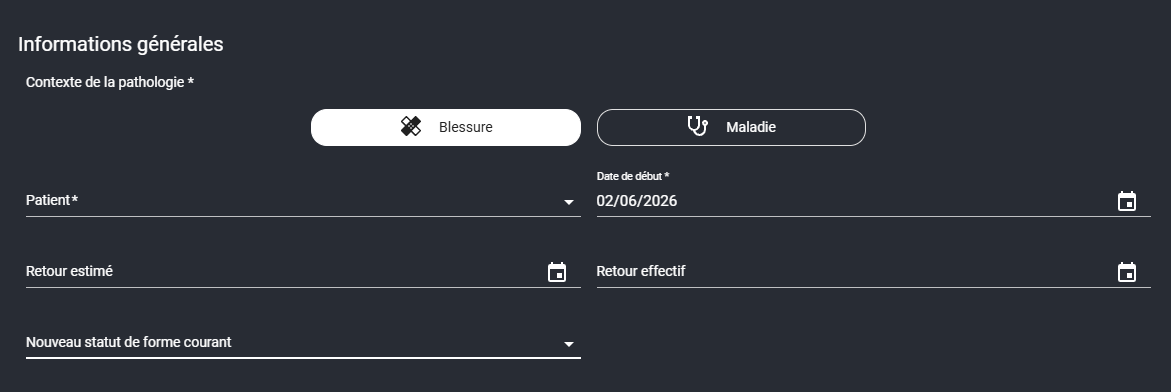
General information
When creating a pathology, the user can fill in the key elements of the file, including:
- The patient
- The start date of the pathology
- The estimated return date
- The actual return date (closes the pathology)
- The new current fitness status
This information provides the foundation for monitoring and immediately places the pathology within the player's availability logic.
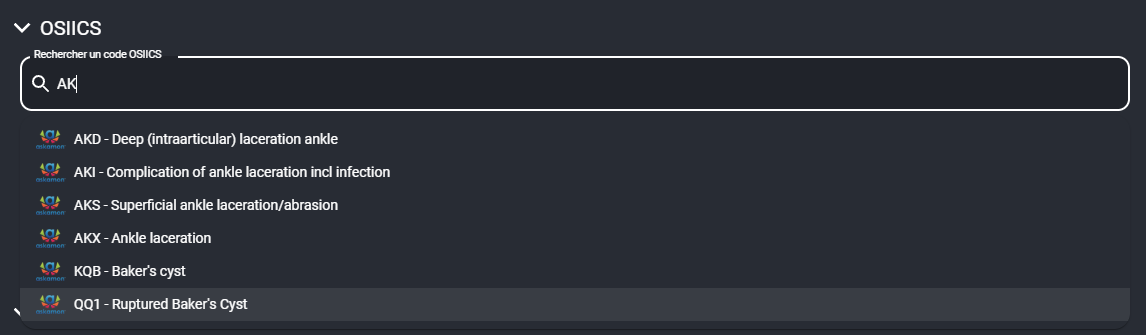
OSIICS search
The diagnostic input has been enhanced with a more comprehensive OSIICS search. The search can be done:
- By code
- By diagnosis
This improvement saves time during input while enhancing the standardization of medical data.
Description fields
Creating a pathology allows detailed information to be recorded, including:
- OSIICS code
- Region
- Type
- Diagnosis
- Laterality
- Position
- Mechanism of action
- Onset
- Contact
- Occurrence
- Surface type
- Pre-existing pathology
- Surgical intervention
Occurrence and recurrence
If the pathology corresponds to a recurrence or a relapse, it can be linked to a previous pathology. This logic allows for more detailed tracking of the history of the same medical issue.
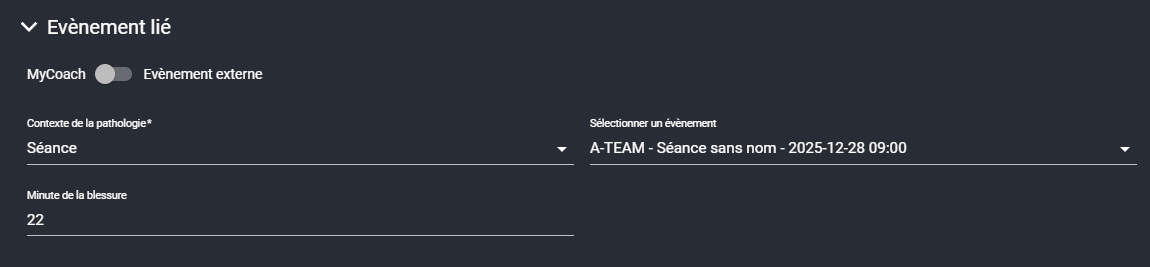
Linking the pathology to an event
A pathology can be linked to an event. This link allows the medical case to be attached to a specific context, for example a training session or another sporting event. This information then improves the quality of reading the file and associated statistics.
Pathology comments
The pathology integrates several levels of comments in order to distinguish information according to its level of distribution.
The spaces provided in this new version are as follows:
- Medical comment
- Paramedical comment
- Medical performance comment
This separation maintains a useful flow of information without exposing all content to all profiles.
The pathology as a central file
Once saved, the pathology becomes the central point of monitoring for the case concerned.
In the pathology detail, several tabs allow you to find a consolidated view of the file:
- General
- Consultations
- Notes
- Comments
- Documents
This organization makes it easy to quickly understand:
- What the player has
- How the situation has evolved
- Which consultations have been carried out
- What information has been added
- What documents are available
The pathology is therefore not just a declaration form. It becomes a complete monitoring file.
Creating a consultation
The consultation is one of the most important evolutions of the module. It is no longer conceived as a simple follow-up note. It becomes a true functional object integrated into the module and the calendar.
Possible entry points
A consultation can be created:
- From the home screen
- From the medical module
- From a patient
- From a pathology
- From the calendar
Consultation information
When creating a consultation, the user can fill in:
- The title
- The consultation type
- The start date
- The duration
- The practitioner
- The patient
- The new current fitness status
- The linked pathology
The consultation can thus be directly attached to an existing file and immediately enrich the monitoring of the related pathology.
Consultation types
Consultation types are configurable in the module. They allow the tool to be adapted to the organization and practices of the structure.
Among the types visible in this new version, you will find in particular:
- Specialist opinion
- Injury
- Illness
- Physiotherapy
- Podiatry
- Nutrition / dietetics
- Care / massage
- Strapping / taping
- Return to play validation
- Traumatology
- Certificate / administrative
Consultation types can also be distinguished according to a medical or paramedical logic, in order to better frame usage according to the relevant rights and profiles.
Consultation visibility
The consultation has its own visibility logic. It determines which people can see the event in the calendar and in the lists.
This visibility relies notably on:
- The authorized role level
- The teams concerned
- The possible visibility for the patient
Consultations as calendar events
Consultations are real calendar events. This means they can:
- Be created in the medical module
- Be visible in the staff calendar
- Be visible in the player's calendar if patient visibility is enabled
- Structure the daily medical agenda
This point is important in the module's philosophy, as it directly connects medical monitoring to the operational organization of daily life.
Adding notes to a consultation
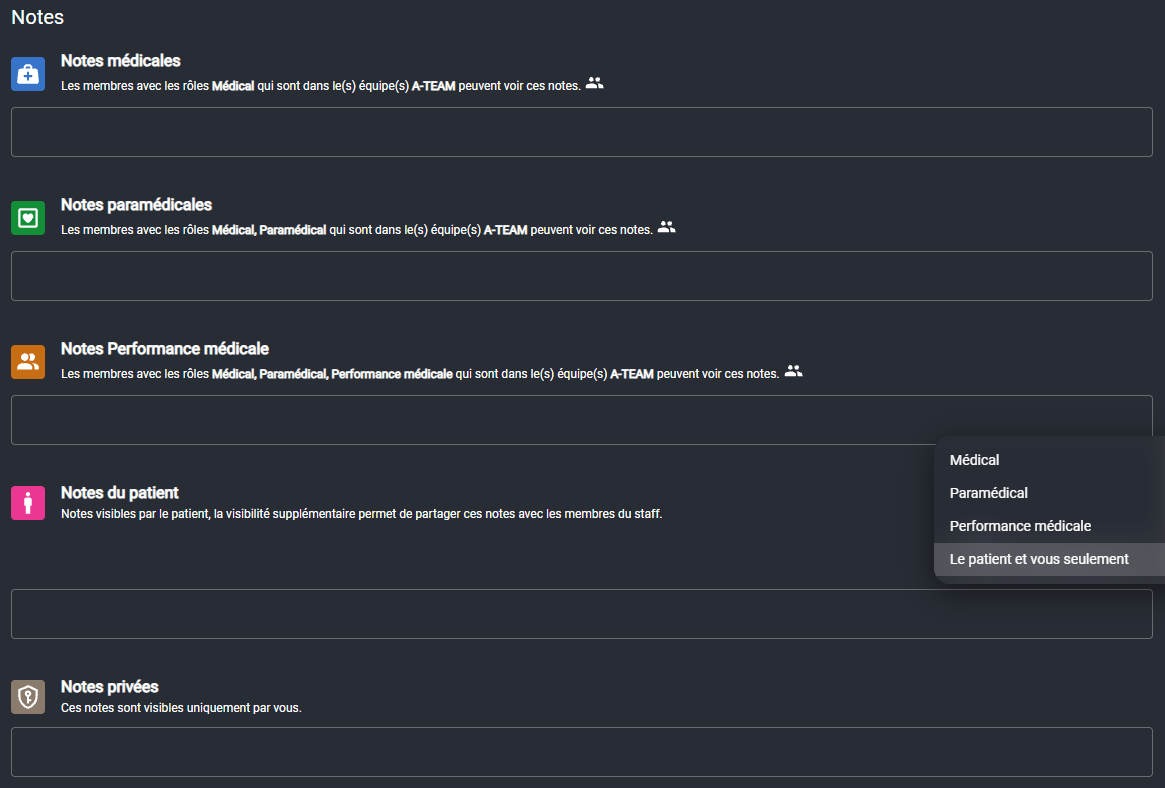
Each consultation can contain multiple notes. Notes allow detailed information to be added, written records of monitoring to be kept, and different content to be shared according to authorized recipients.
Note categories
The categories visible in this new version are as follows:
- Medical notes
- Paramedical notes
- Medical performance notes
- Patient notes
- Private notes
Reading logic
The module clearly distinguishes two levels:
| Level | Role |
|---|---|
| The consultation | Defines who sees the event |
| The note | Defines who sees the detailed content |
This separation provides real precision in the management of sensitive information.
Traceability
Each note belongs to its author. This guarantees:
- Traceability of contributions
- Responsibility for data entry
- The ability for multiple users to add their own information within the same consultation
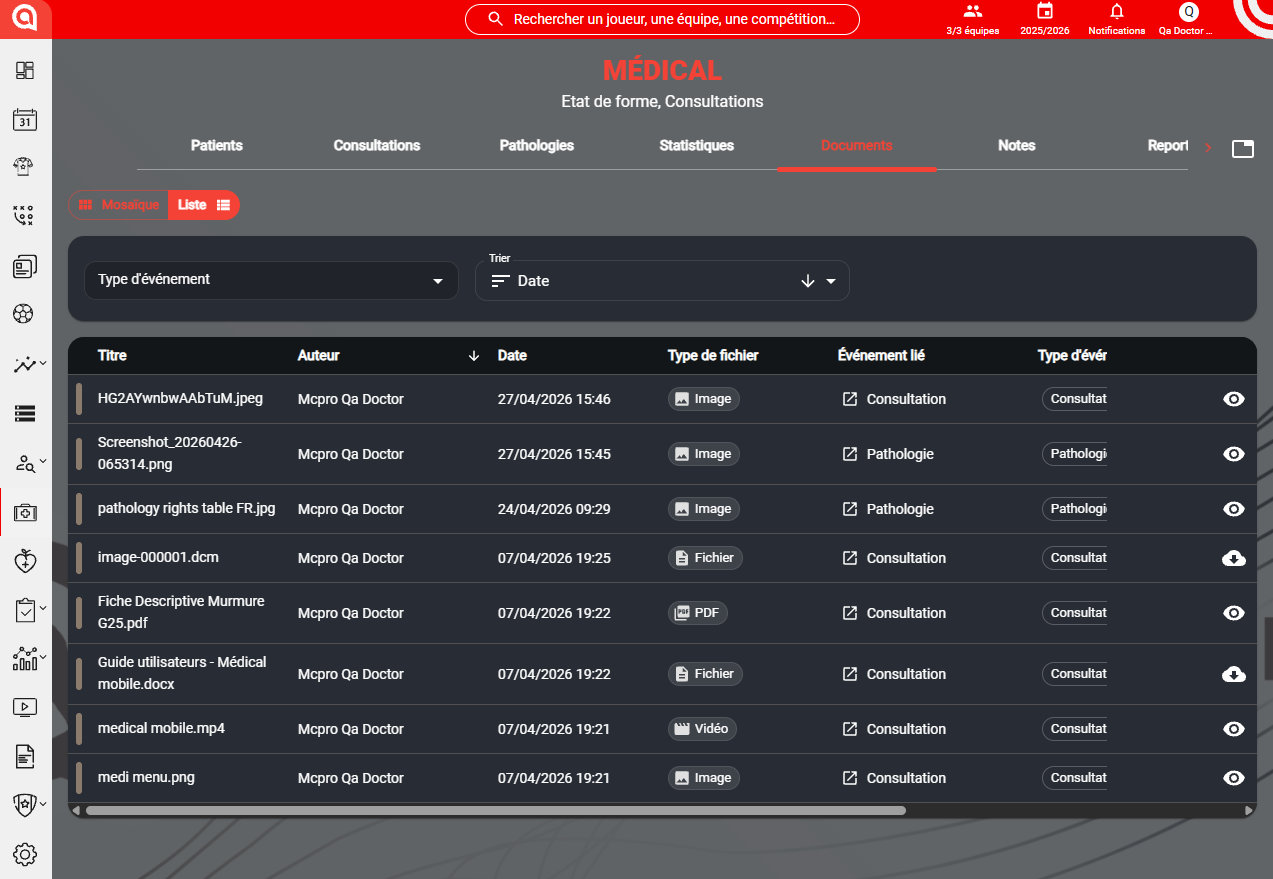
Documents linked to consultations and pathologies
Documents can be added within a consultation and then found in the linked pathology. This logic automatically consolidates useful files in the right folder.
Possible actions on documents
Documents can be:
- Added
- Viewed
- Modified
- Deleted
- Shared according to different levels of visibility
Thanks to this consolidation, the pathology becomes a complete view of the medical case, including both the entered information and the files useful for monitoring.
Connecting and configuring Askamon
Askamon synchronization remains available in this new version. The module allows you to connect an Askamon account and map patients from Askamon with the players present in MyCoach Pro.
The aim of this synchronization is:
- To avoid double data entry
- To save time
- To streamline exchanges between tools when the organization already uses Askamon
When creating a pathology, it is also possible to define whether the file should be synchronized with Askamon.
Statistics and epidemiology
The module includes a statistics section dedicated to epidemiology. This analysis layer is based on pathologies, fitness statuses and exposure data calculated on the platform.
The objective is not only to count injuries, but to allow a broader reading of collective and individual medical monitoring.
Collective indicators
The statistics view can display in particular:
- Number of injuries
- Number of injured players
- Number of illnesses
- Number of ill players
- Exposure in hours
- Incidence
- Injury burden
Collective player timeline
A timeline per player allows you to visualize:
- Fitness status periods
- Unavailability periods
- Injuries over time
- Possible overlaps between multiple cases
Individual reading
When a patient is opened, the module can display an individual reading of their indicators and history. Statistics therefore complement daily monitoring by providing a cross-sectional reading of medical information.
Configuring injury color scales
The module allows you to define customized color scales for certain statistical views. This configuration adapts the reading to the organization's internal codes and makes the tables more readable.
The views concerned include in particular:
- Collective unavailability
- Number of collective injuries
- Individual unavailability
Configuring injury exposure
The calculation of injury exposure is configurable in the module. The user can define which events are included in the calculation, for example:
- Matches
- Training sessions
- Player sessions
- Player monitoring
It is also possible to choose the unit used for certain GPS durations and to select the types of sessions taken into account.
This configuration is important, as it determines the consistency of the epidemiological indicators displayed in the module.
Confidentiality and rights matrix
The new version of the medical module is based on a fine-grained confidentiality logic. This logic does not depend on a single level of authorization. It combines several filters:
- User profile rights
- The medical or paramedical nature of certain actions
- Consultation visibility
- The visibility specific to each note
- Document visibility
- Possible patient access
This architecture allows useful information to be shared with the right people, without compromising the sensitivity of medical data.
Rights tables
-
Rights table for pathologies
-
Rights table for consultations
-
Rights table for notes


Data security and hosting
Medical data is hosted on HDS-certified servers. This meets the security and hosting requirements expected for sensitive health data.
Summary
The MyCoach Pro web medical module evolves medical management from a simple data entry space to a complete management, monitoring and analysis environment.
Its operation is based on a few key principles:
- A pathology that becomes the central element
- A consultation that becomes a true monitoring event
- Notes that allow information to be distributed according to the right levels of visibility
- Documents consolidated directly in the file
- A statistical reading that extends daily monitoring through epidemiological analysis
Together, these features allow for more structured monitoring, better circulation of information, and clearer exploitation of medical data over time.