Filter your home page
The Filters button on the home page chooses the teams whose widgets are displayed, and sets what the fitness statuses and the projection show.
Open the filters
-
On the Home page, click Filters, in the top right corner. The panel opens on the side.
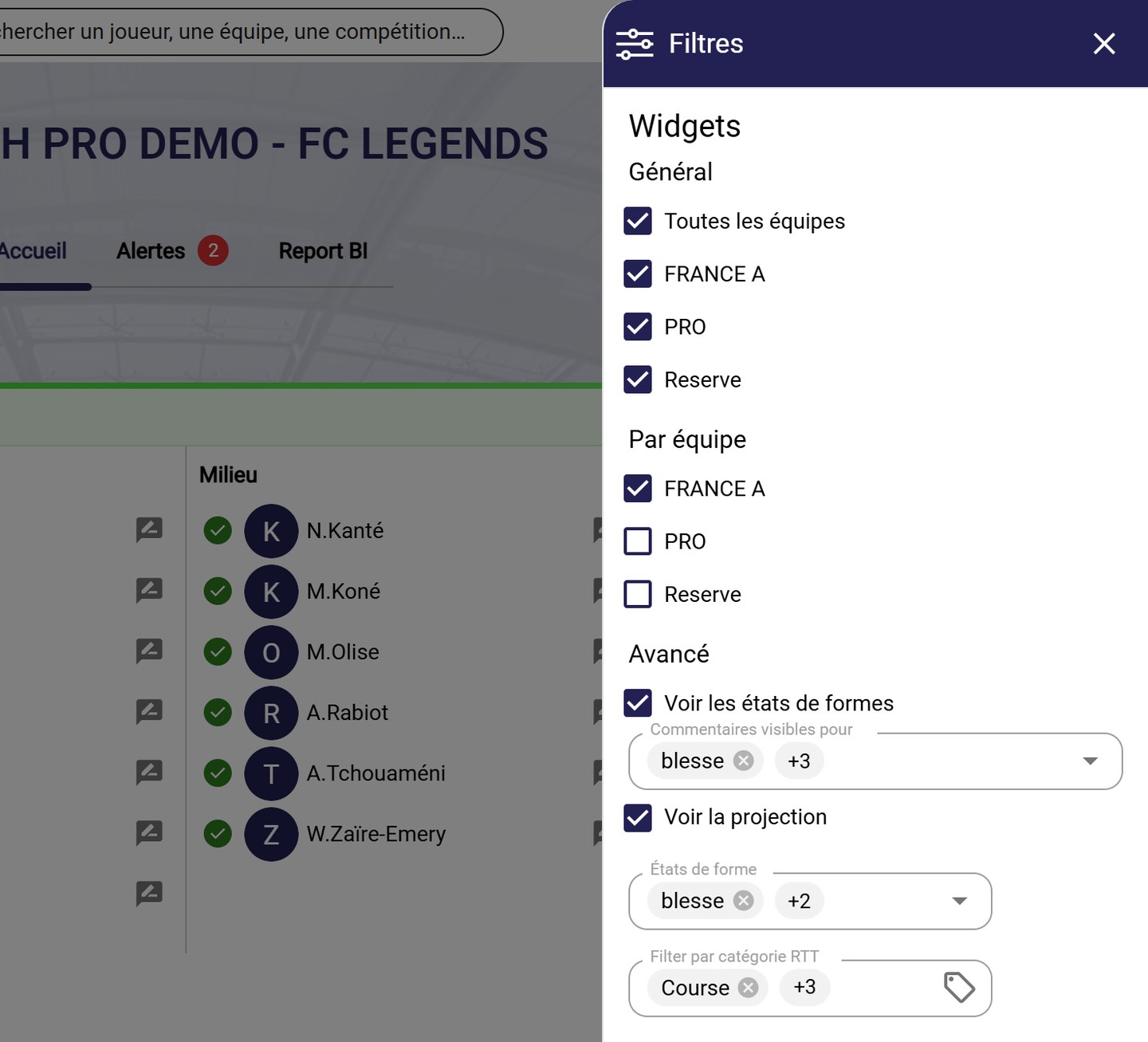
The Filters panel
Choose the teams
-
Under Global, tick the teams that the general widgets take into account. All teams ticks them all at once.
-
Under By team, tick the teams that have their own section on the home page, with its team widgets (fitness statuses, the team's next sessions…).
Set the fitness statuses and the projection
-
Under Advanced:
- See form types displays the fitness status block of each team. Comments visible for chooses the fitness statuses whose comments are displayed;
- See projection displays the Projection block, which tracks unavailable players from yesterday to tomorrow. Form types and Filter by RTT category choose the players and the rehabilitation categories displayed.
See Player monitoring widgets for details of the projection.
-
Close the panel with the cross: the home page updates.
Filters only apply to your home page. Other users keep their own settings.
Need help
Email support@mycoachpro.io with any questions about the home page filters.